
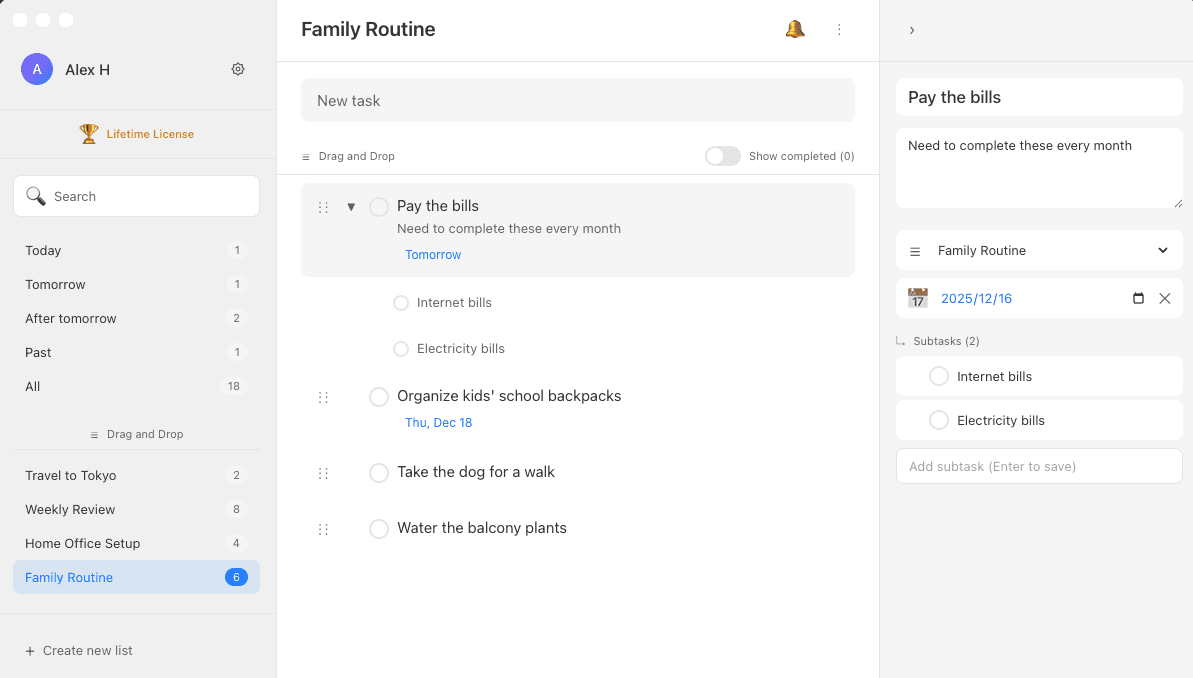
Why You Need Desktop App for Google Tasks
Google Tasks web version is great, but only available as a sidebar in Gmail or Google Calendar
Web version of Google Tasks lacks native features like global shortcuts and menu bar integration
Ultra Todo gives you a dedicated desktop app to focus on your todos
Who Uses Ultra Todo to Manage Google Tasks
You already use Google Tasks web or mobile app and want a dedicated desktop application
You want a simple, direct way to keep your desktop in sync with Google Tasks
You like the design style of todo apps like Microsoft To Do, TickTick, or Wunderlist
Key Features of Ultra Todo
Designed for Mac users who want to use Google Tasks on desktop, making task management simpler and faster
Real-time Google Tasks Sync
All actions sync instantly, making Google Tasks simpler and faster on desktop
- Add, edit, delete tasks sync instantly
- Support for multiple task lists
- Full subtask support
Full-text Search All Tasks
Enter keywords to search all tasks, quickly find tasks no matter where they are
- Search across lists
- Edit directly from search results
- Instant search results
Smart Time Filtering
One-click filter for Today, Tomorrow, Day After Tomorrow, Overdue tasks
- Know exactly what to complete today
- View all tasks overview
Flexible Task Sorting
Support drag-and-drop, sort by due date, sort alphabetically
- Put important tasks at the top
- Arrange by due date from nearest to farthest
- Adjust according to your habits
Dark Mode
Support light and dark themes, one-click switch to protect your eyes
- Auto-switch with system settings
- Manual switch also convenient
- Carefully tuned dark colors
Global Shortcut to Add Tasks
Press Control + Option + Command + Space to quickly add tasks
- No need to switch windows
- Record ideas immediately
- Sync instantly after adding
Choose Your Plan
7-day free trial, no credit card required
Monthly
Billed monthly, cancel anytime
- Full feature access
- Continuous updates
Yearly
$2.49/mo equivalent
- Full feature access
- Continuous updates
Lifetime
One-time purchase, use forever
- Full feature access
- Current major version updates
Want to learn more?View Full Feature Comparison
Frequently Asked Questions
If you need help, contact us at contact@ultratodo.app
- Ultra Todo is a Google Tasks desktop application designed exclusively for macOS
- Since Google Tasks web version can only be used as a sidebar in Google Calendar or Gmail, without full-screen operation, we developed this standalone app
- Security and data accuracy are our top priorities
- Login uses Google OAuth authentication - your password is only entered on Google's website, developers cannot access it
- Your task data is only sent to Google servers, not anywhere else
- Data is only stored on your computer and Google servers
- First version released in December 2025
- Continuously updated, feedback is welcome
- Ultra Todo is designed to replicate Google Tasks functionality in a desktop app as much as possible
- While adding extra features to make Google Tasks even better
- We plan to update regularly
- Scheduled development items are in progress
- New version releases will be announced on the website
- If you find any issues or have suggestions, please contact us
- Email: contact@ultratodo.app
- Click "Select Plan" to be redirected to Polar.sh, Ultra Todo's authorized payment service provider.
- Credit card payment is supported (with bank-level security encryption provided by Polar.sh).
- After successful payment, you will be automatically redirected back to our website.
- Sign in and go to the Account page
- Click the "Cancel Subscription" button in the Subscription Status section
- After cancellation, you can continue using until the current period ends
- After canceling, you can continue using Ultra Todo until the current period ends.
- Example 1: If you cancel during the 7-day trial, you can use until the trial ends.
- Example 2: If you subscribe on Dec 13 (trial ends Dec 20, first billing starts), and cancel on Dec 22, you can use until Jan 20 (end of first paid month).